Help / OBS Studio
Import the OBS scene collection
Your setup page and zip include an OBS scene-collection file (JSON) with every scene already added as a browser source at the right size.
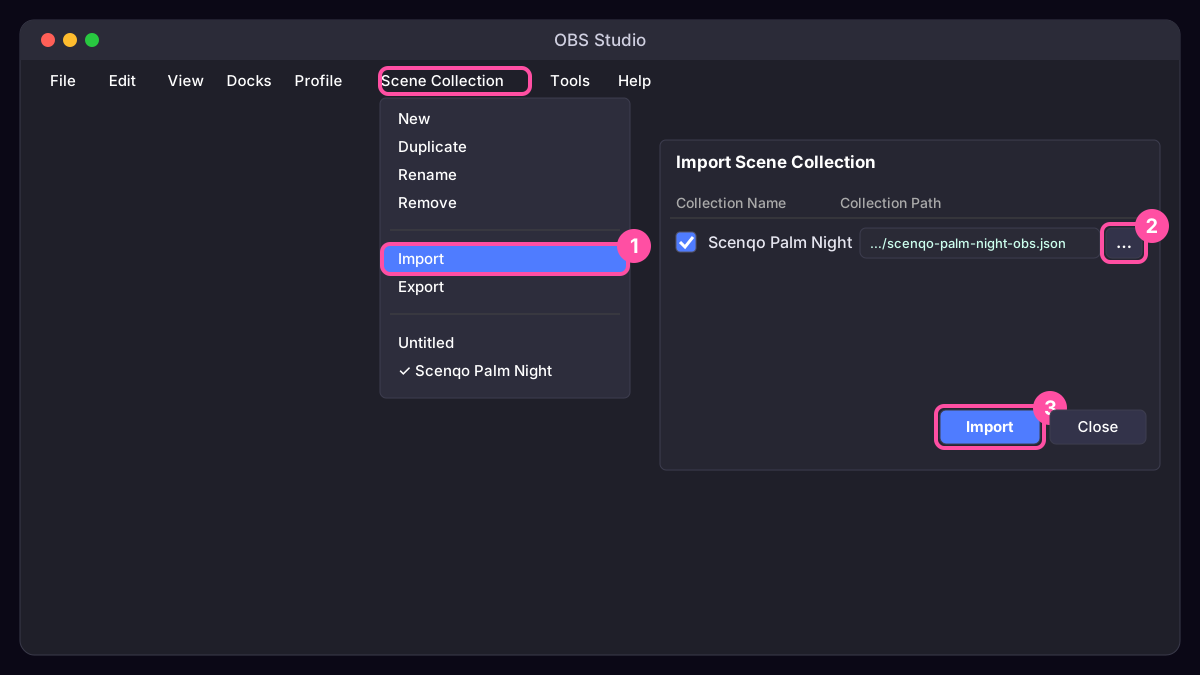
- OBS menu bar: Scene Collection, Import.
- Press the … button next to Collection Path and pick the file (scenqo-palm-night-obs.json or the one in the zip’s obs folder).
- Tick its box and press Import.
- Scene Collection menu again: choose the new Scenqo collection.
Already have a collection you like? Import the Scenqo one, then copy the sources you want (right-click, Copy) and paste them into your own collection’s scenes.
Changed your name or colours? Make new links on the setup page and download the collection again, or edit each browser source’s URL.
Was this missing something? Tell us and we’ll add it.